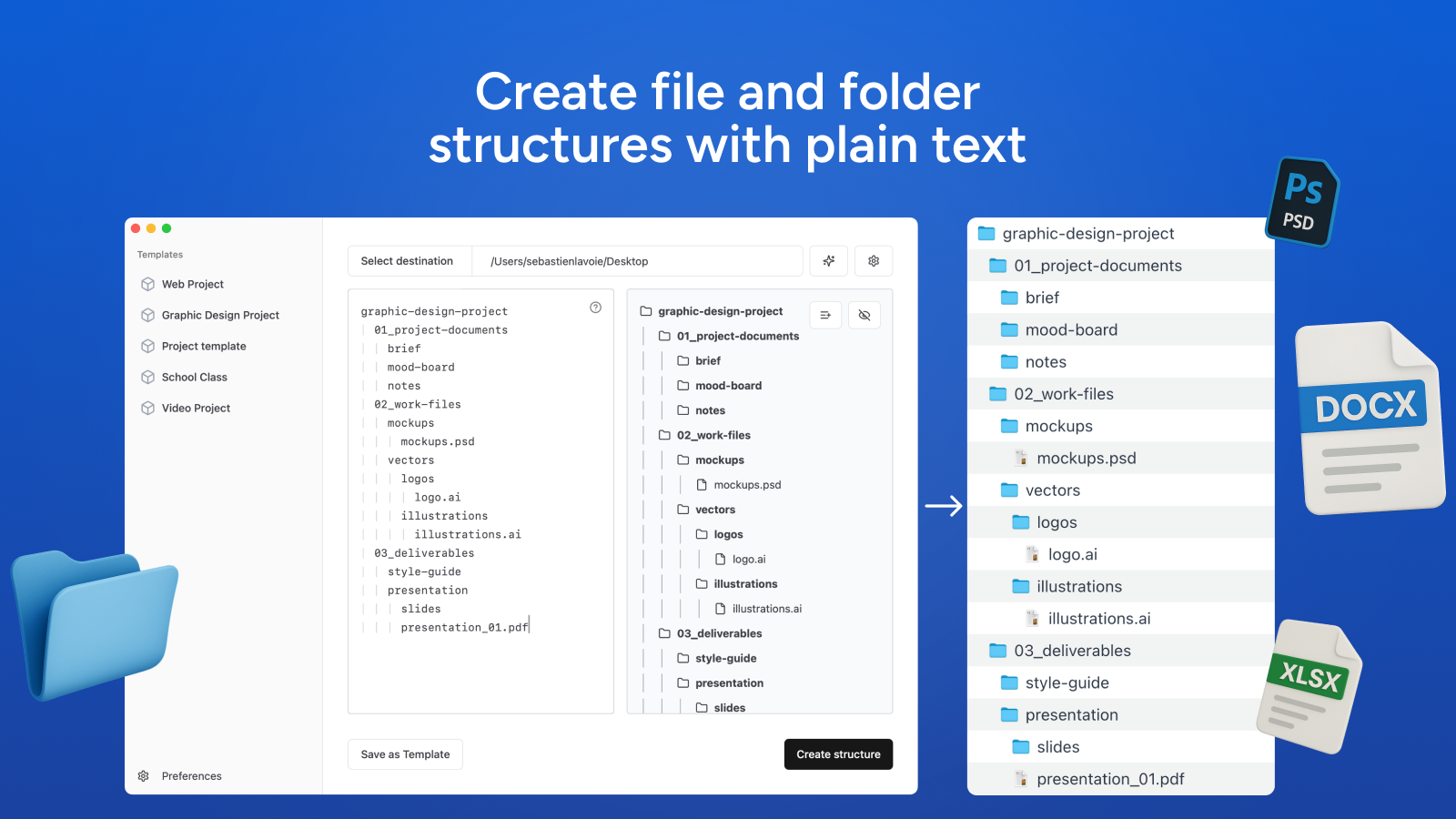
File Architect is a macOS app to create file and folder structures from plain text outlines.
Key features include:
📁 Folder/File Structure: Lines with dots are files and without dots are folders. Indent with tabs for nesting.
⚙️ Advanced Operations: Additional syntax available for more complex operations. Copy, rename, or move files or folders and their content.
🤖 AI Structures: Don’t know how to design a structure? Get an AI-Generated structure from a simple prompt.
✅ Valid Blank Files: Files are created as valid blank files that open, not 0 byte stubs.
💾 Templates: You can save templates to reuse later.
⚡ Fast and minimal: The app doesn’t save anything you create. It’s fast, lightweight (19.9 mb) and simple. Just the necessary and nothing else.
💻 Open-Source Engine: Engine behind the app is open-source. You can use it via command-line:https://github.com/filearchitect
Ideal for:
Developers
Project Managers
Anyone needing organized file structures
File Architect eliminates tedious manual file creation, providing a fast, private, and easy-to-use solution for creating clean and efficient project structures.
File Architect is a productivity tool listed on OpenHunts. The listing describes it as a macOS app to create file and folder structures from plain text outlines.
File Architect highlights 📁 folder/file structure, ⚙️ advanced operations, and 🤖 ai structures. The listed feature details mention ways to lines with dots are files and without dots are folders. Indent with tabs for nesting, additional syntax available for more complex operations. Copy, rename, or move files or folders and their content, and don’t know how to design a structure? Get an AI-Generated structure from a simple prompt.
File Architect is listed as freemium on OpenHunts. Check the official website for current plan limits, trials, and billing details.

File Architect is best for developers, project managers, and anyone needing organized file structures. It is also useful for people comparing productivity tools on OpenHunts.
Use the related projects section and category pages on OpenHunts to compare File Architect with other productivity tools by platforms, pricing, and community activity.
These tools are selected from similar categories, platforms, and community activity on OpenHunts.

🎯 What it does: Transforms GitHub repositories into professional, ATS-optimized resume content using AI✨ Key Features:Analyzes your code and generates resume bullet pointsSupports multiple AI providers (Gemini, OpenAI, Groq, Claude)Works with both public and private repositoriesGitHub OAuth integration for secure accessDocker-ready for easy deployment🔧 Tech Stack: Python, FastAPI, Redis, Docker, Tree-sitter for code parsing🚀 Perfect for:Students turning projects into resume experienceDevelopers showcasing their workJob seekers needing ATS-friendly contentAnyone wanting to highlight their coding achievements📋 Output: Structured JSON with project titles, tech stacks, achievement bullets, and interview prep questions💡 Bottom Line: Stop staring at blank resume pages - let your GitHub repos write your resume for you!

Repo Radar is a Mac menu bar app that helps developers track their favorite GitHub repositories. Key features include:Repository Watching: Add repositories by URL or owner/repo to monitor.At-a-Glance Updates: See the latest release, star count, and activity directly from the menu bar.Smart Notifications: Get alerted when new releases are published.Ideal for:Developers who want to stay updated on open-source tools.Project maintainers monitoring their own repositories.Anyone who wants to track GitHub activity without browser clutter.Repo Radar provides a lightweight and native Mac experience, built with Swift, for fast and efficient GitHub monitoring.

Mouzi is a silent, elegant file organizer that lives in your system tray and keeps your Downloads folder (and any other folder) automatically tidy. It runs quietly in the background, monitors selected folders, and moves, renames, or sorts files based on customizable rules.✨ Features🔇 Silent by DefaultRuns 24/7 in the background with minimal resource usage (~5 MB RAM)Automatically organizes new files as they arriveShows a subtle Windows toast notification with the count of organized filesSilent autostart with Windows📁 Smart Rules EngineImages (.jpg, .png, .gif, .webp...) → Downloads/Images/Documents (.pdf, .docx, .xlsx...) → Downloads/Documents/Archives (.zip, .rar, .7z...) → Downloads/Archives/Installers (.exe, .msi...) → Downloads/Installers/Music / Video → dedicated foldersCatch-all rule for everything else🛠️ Fully CustomizableCreate your own rules with extensions, regex patterns, and destination foldersUse dynamic placeholders in paths: {year}, {month}, {day}, {extension}, {filename}Reorder rules by priority - first match wins🚫 Ignore Rules (.mouziignore)Per-folder ignore patterns — like .gitignore for your filesSet up via Settings UI or write a .mouziignore file manuallySupports wildcards (*.tmp), exact names (.DS_Store), and folders (node_modules/)📜 History & UndoEvery action is logged locally in SQLiteUndo any single move with one clickClear history anytime🌍 Multi-languageAuto-detects your Windows system language. Supported:🇬🇧 English🇵🇱 Polish🇮🇹 Italian🇩🇪 German🇫🇷 French(Falls back to English if system language is not supported)🕶️ Dark ModeFollows system theme, or force Light / Dark mode from settings🔒 Privacy First100% offline - zero cloud, zero file name uploadsNo telemetry by defaultSystem files ignored - desktop.ini, Thumbs.db, .DS_Store, and other OS hidden files are never touchedPortable version available - run without installing, leaves no trace in the registryAll data stored locally in your user profile folder

TOK (Talk to Type) is a speech-to-text transcription tool for macOS. It instantly converts spoken words into text. Key features include: Real-time Transcription: Converts speech to text as you speak. Offline Mode: Utilizes Ollama Whisper for offline transcription. Hotkey Activation: Uses a hotkey for quick activation and deactivation. Ideal for: Writers and journalists Students taking notes Anyone needing fast and accurate transcription TOK offers a seamless and efficient way to transcribe speech into text on macOS, with the added benefit of offline functionality.

IntroductionSpacedrive is a file manager that unifies files from all your devices and clouds into a single, easy-to-use explorer. Key features include:Unified File System: Combines local drives and cloud storage into one searchable database.Cross-Platform Access: Organize and explore files from any device.Tag-Based Organization: Use tags to categorize and quickly find files.Virtual File System (VDFS): Enables efficient storage and retrieval.Ideal for:Creators who need to manage large media libraries.Hoarders with extensive digital collections.Painfully disorganized individuals seeking better file management.Spacedrive offers a future-proof file management solution with its distributed filesystem and content addressable storage, providing a more efficient and organized way to handle your digital life.

IntroductionDev Hunt is a community-driven platform for discovering and sharing the best new developer tools. It's a launchpad built by developers, for developers, emphasizing open source and fairness. Key features include:Discovery: Find trending and newly launched dev tools.Voting: Developers vote on their favorite tools, influencing the rankings.Community: Connect with other developers and the creators of the tools.Ideal for:Developers seeking new tools to improve their workflow.Open-source projects looking for visibility.Companies launching new developer-focused products.Dev Hunt provides a focused and curated space for the developer community to discover and promote valuable tools, fostering collaboration and innovation.