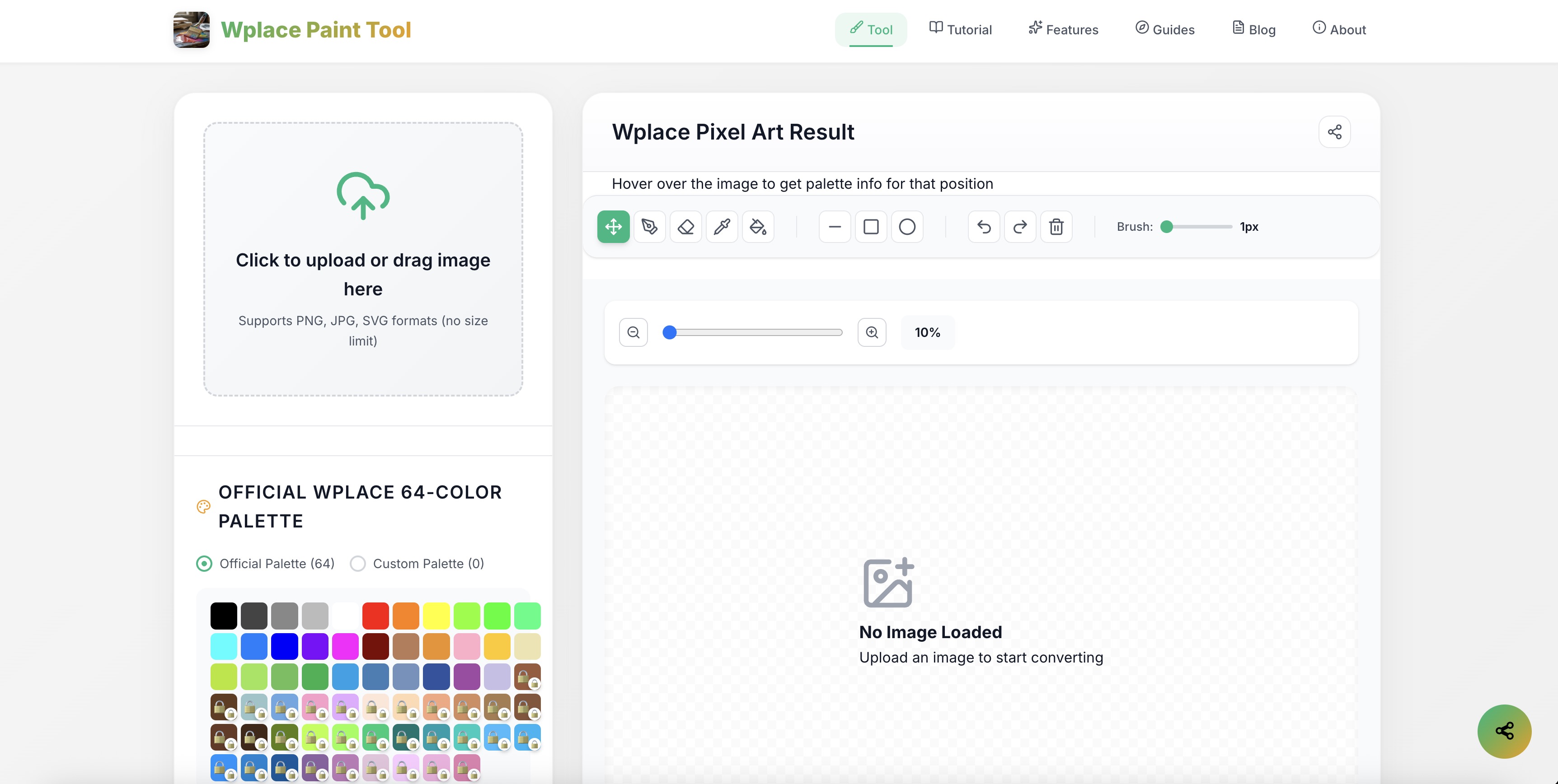
Wplace Paint Tool is a free web-based pixel art converter that transforms images into pixelated artwork. Key features include:
Ideal for:
Wplace Paint Tool offers a user-friendly interface and a range of customization options, making it accessible to both beginners and experienced pixel artists. The ability to use custom palettes and analyze color usage provides a unique level of control and insight.
Wplace paint tool is a design tool listed on OpenHunts. The listing describes it as a free web-based pixel art converter that transforms images into pixelated artwork.
Wplace paint tool highlights image conversion, dithering options, and palette selection. The listed feature details mention ways to easily convert PNG, JPG, and SVG images into pixel art with adjustable pixel sizes, enhance color transitions and detail with Floyd-Steinberg dithering, and choose from preset palettes like Wplace, Pico-8, and more, or create custom palettes.
Wplace paint tool is listed as free on OpenHunts. Check the official website for current plan limits, trials, and billing details.
Wplace paint tool is best for game developers creating retro-style graphics, digital artists experimenting with pixel art, and hobbyists and beginners learning pixel art techniques. It is also useful for people comparing design tools tools on OpenHunts.
Use the related projects section and category pages on OpenHunts to compare wplace paint tool with other design tools tools by platforms, pricing, and community activity.
These tools are selected from similar categories, platforms, and community activity on OpenHunts.

MermaidViewer is the ultimate online tool for creating, editing, and sharing Mermaid diagrams. Instantly see live previews as you type, use AI-assisted code generation to speed up diagram creation, and export your work in SVG, PNG, or Markdown with ease. Collaborate in real-time with team members or work solo — no installation required. Perfect for flowcharts, sequence diagrams, Gantt charts, and other technical visualizations, MermaidViewer.com combines speed, accuracy, and simplicity in one intuitive platform. Ideal for developers, product managers, and teams who want professional-quality diagrams quickly and efficiently.

AI image generator that creates studio-quality visuals through chat. Refine designs across multiple turns without restarting and export up to 4K. No Photoshop or prompt engineering needed.Key features include:Chat-based image generation: Describe your vision and iterate through conversation for perfect results.Multi-turn refinement: Easily tweak and improve images without starting over.Pro-quality export: Export visuals up to 4K resolution with no quality loss.Ideal for:Content creators needing high-CTR thumbnailsBrands requiring consistent visual assetsE-commerce businesses for product photographyA powerful AI image generator for effortless, professional visual creation.

Curated software directory for essential productivity, dev, design, and AI tools. Discover the must-have software and services to enhance your digital stack. Key features include:Hand-picked selections: Expertly curated list of top-tier software across various categories.Comprehensive categories: Explore tools for AI, development, design, productivity, and more.Discount and affiliate programs: Access exclusive deals and earn through referrals.Ideal for:Developers seeking new toolsDesigners looking for inspirationProductivity enthusiasts optimizing workflowsFind your next essential tool with this comprehensive software directory.

Oniichan is an all-in-one AI manga generator, AI comic creator, and anime art platform that takes you from a story concept to complete illustrated manga pages. Describe your story and the AI generates a structured outline, character reference sheets, and full manga pages with consistent character designs across every panel. Edit individual pages, panels, or characters after generation using AI-powered inpainting and region-level edits. The platform includes an AI anime character creator, OC maker, character reference sheet generator, AI line art colorization, image upscaling, video-to-anime conversion, and image animation tools. A reusable character library lets you save and reuse designs across projects. Supports manga, manhwa, webtoon, and comic art styles with public sharing and presentation mode built in. Free tier available with no sign-up required for basic tools.

tiny.SUPPLY is a custom avatar service that creates simple, minimalistic profile pictures. Key features include:custom hand-drawn avatar in SVG format, made in Figma.clean and simple aesthetic for profile pictures.reflecting character's persona, unique for each member.Ideal for:Individuals seeking a unique and personalized profile picture.Companies looking for consistent branding across employee avatars.Crypto and gaming enthusiasts.

PhotoGPT is a free AI photo editor, enhancer, and generator that creates stunning visuals online in seconds. Key features include:AI-Powered Editing: Automatically enhance and edit photos with AI.Realistic Image Generation: Generate lifelike portraits, product shots, and lifestyle photos.Versatile Applications: Create visuals for portraits, product photography, social media, and marketing.Ideal for:Social Media ManagersE-commerce BusinessesMarketing ProfessionalsPhotoGPT offers a fast, free, and easy way to create professional-quality images without needing complex software or design skills.Try PhotoGPT: https://photogpt.io/