
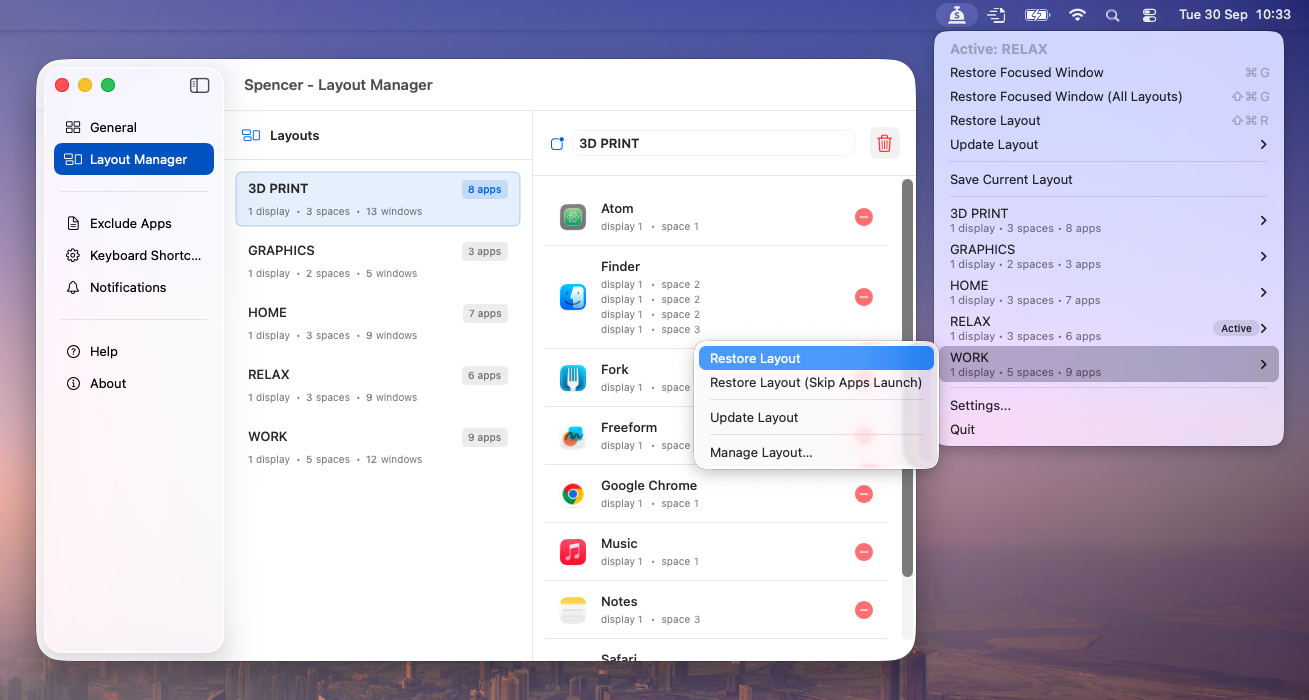
Spencer is a window manager for macOS that saves and restores your perfect workspace layouts. Key features include:
Ideal for:
Spencer offers a unique approach to window management by saving not just window positions, but also app states and space configurations, ensuring a truly complete workspace restoration.
Spencer is a productivity tool listed on OpenHunts. The listing describes it as a window manager for macOS that saves and restores your perfect workspace layouts.
Spencer highlights save and restore layouts, multiple spaces support, and app management. The listed feature details mention ways to one-click saving and restoring of window arrangements, works across multiple macOS spaces, and launches saved apps and hides unsaved ones.
Spencer is listed as paid on OpenHunts. Check the official website for current plan limits, trials, and billing details.
Spencer is best for developers who need consistent coding environments., designers managing multiple design tools., and anyone who wants to quickly restore their preferred window setup for different tasks.. It is also useful for people comparing productivity tools on OpenHunts.
Use the related projects section and category pages on OpenHunts to compare Spencer with other productivity tools by platforms, pricing, and community activity.
These tools are selected from similar categories, platforms, and community activity on OpenHunts.

IntroductionMenuist is a Finder right-click menu enhancement tool for macOS designed to improve file management efficiency. It extends the functionality of the right-click menu and offers menu bar favorites navigation.Key features include:Enhanced Right-Click Menu: Extends Finder's right-click menu with new functionalities.Menu Bar Favorites: Provides convenient file management through menu bar navigation.Quick File Operations: Enables quick file creation, preview, copying file paths, and QR code sharing.Folder Navigation: Offers quick access to frequently used folders and folder history.Customization: Allows folder icon color customization for better organization.Ideal for:Mac users seeking improved file management.Developers needing quick access to file operations.Anyone looking to streamline their workflow on macOS.Menuist provides a comprehensive solution for efficient file management on macOS, offering a blend of enhanced right-click functionality and convenient menu bar navigation.

Mousio is a keyboard-based mouse control tool that allows users to move, click, and drag the mouse cursor using only the keyboard. Key features include:Keyboard-driven cursor control: Instantly move and position the mouse pointer using keyboard shortcuts.Grid navigation mode: Navigate precisely using a resizable on-screen grid.Custom Dock-style launcher: Create a customizable Dock-style panel for quick app or action access.Multi-display support: Seamlessly move the cursor across multiple monitors.Ideal for:Users with accessibility needs who have difficulty using a mouse.Developers and designers who prefer keyboard-centric workflows.Anyone looking to boost productivity and reduce mouse usage.Mousio offers a unique approach to mouse control, providing a customizable and efficient alternative to traditional mouse input.

LikeDo is an all-in-one productivity platform that streamlines your workflow by combining multiple tools into a single interface. Key features include:Short Link Management: Create, customize, and track short links with real-time access statistics.Email Management: Create domain-based email addresses, send and receive emails, and utilize AI-powered email assistance.AI-Powered Content Creation: Leverage AI for writing and content generation.Ideal for:Individuals seeking to simplify their online presence.Small businesses looking for a cost-effective productivity solution.Developers who want to integrate with open APIs.LikeDo offers a centralized hub for essential online tasks, saving you time and effort by eliminating the need to juggle multiple tools.

soAlternative is a web platform that helps users discover and compare alternatives to popular design, development, and productivity tools. Key features include:AI-Powered Search: Find alternatives using AI.Curated Lists: Browse curated lists of alternatives organized by tool type.Feature Comparison: Compare features of different tools.Ideal for:DesignersDevelopersProject ManagerssoAlternative simplifies the process of finding the perfect tool by providing a centralized and AI-powered comparison platform.

Behavioral finance app that helps stop impulse spending with psychology-backed tools and real-time nudges. Key features include:Impulse spending tracker: Identify and understand your spending triggers to gain control.Mindful spending tools: Utilize behavioral finance principles for better financial wellness.Real-time nudges: Receive timely prompts to prevent impulsive purchases.Ideal for:Individuals struggling with impulse spendingThose experiencing financial anxietyAnyone seeking to build better money habitsA psychology-backed solution for overcoming impulse spending and achieving financial control.

Your research is in the browser. Your notes are in Notion. Your diagrams are in Excalidraw. Your AI is in a chat box. Dim0 puts everything on one canvas.Dim0 is an open-source thinking canvas where your AI doesn't answer in a chat — it builds directly on your board. Research visually, think spatially, build with AI.- AI agent that reads your canvas, searches the web, and creates nodes directly on your board- Rich notes with markdown, math, code blocks and highlights- Hand-drawn shapes and diagrams like Excalidraw- Live HTML widgets — charts, visual explainers, interactive dashboards on the canvas- Nested boards for organizing larger workspaces- Presentation mode — frame and present directly from the canvas- 100% open source, self-hostable, works with OpenAI, Claude, Gemini, Mistral, DeepSeek and moreIdeal for researchers, students, and builders who think visually and are tired of switching between tools.