Side Space | Your AI-Powered Vertical Tabs Manager for Chrome and Firefox.
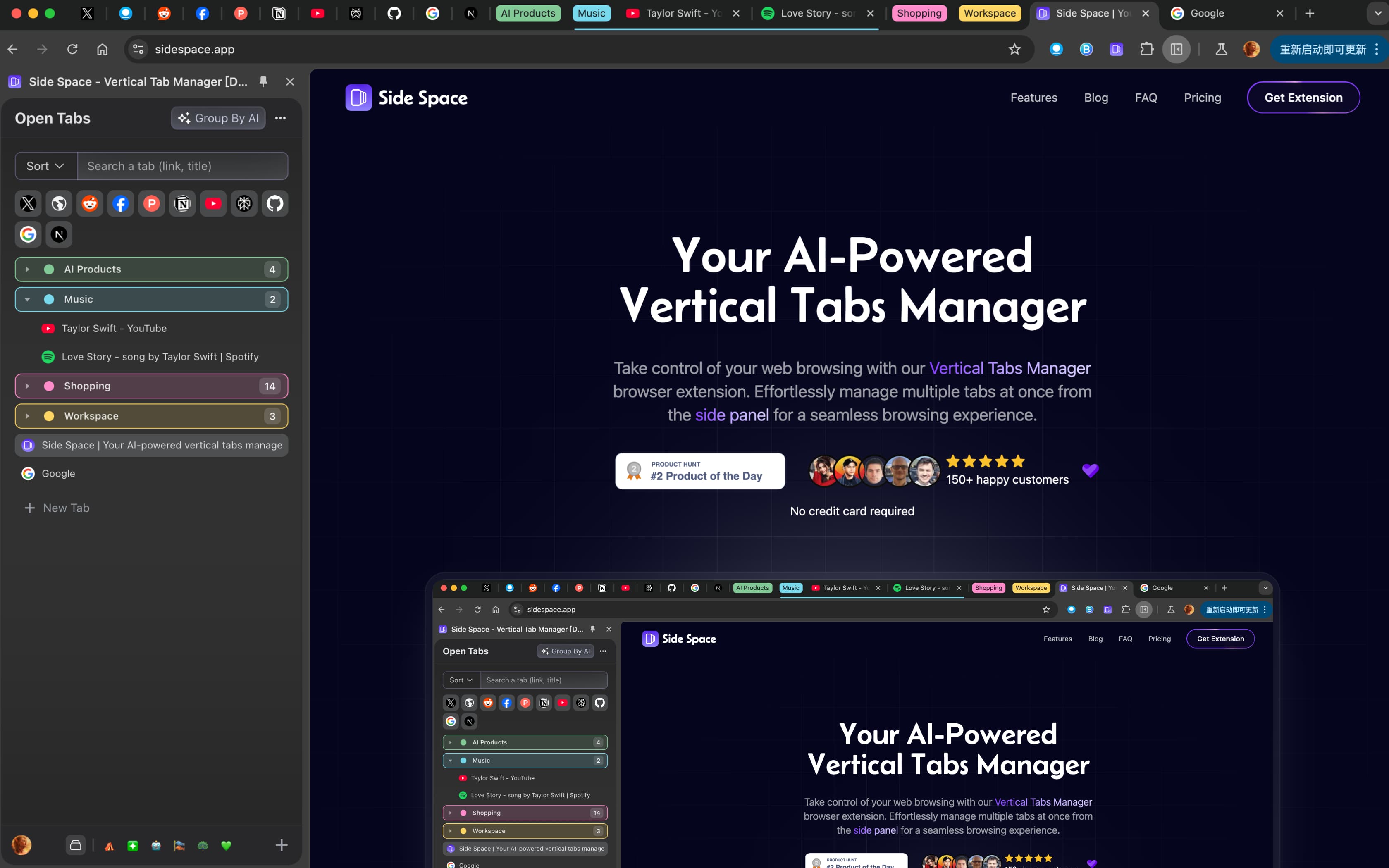
🌈 Arc-like Side Panel
We’ve built an Arc-like side panel that transforms your tabs into a sleek vertical layout, making it easier than ever to navigate and manage your workspace.
🧠 Smart AI Grouping
It’s not just about organizing tabs—it’s about doing it intelligently. Our AI grouping feature clusters tabs based on content for a streamlined experience. Plus, you have control with our Group Guardian feature, letting you customize tab groupings using URL matches to set your own organizational rules.
☁️ Spaces & Cloud Sync
Take productivity to the next level! Save your tabs into different Spaces and we automatically sync them to the cloud. Your organized tabs are accessible across devices, so you can browse seamlessly wherever you are.
With Side Space, you get a clean design, AI-powered organization, and total flexibility in how you structure your browsing.
Side Space - Your AI-Powered Vertical Tabs Manager is a productivity tool listed on OpenHunts. The listing describes it as Side Space | Your AI-Powered Vertical Tabs Manager for Chrome and Firefox.

Based on the OpenHunts listing, Side Space - Your AI-Powered Vertical Tabs Manager works as a productivity tool. Check the project description, screenshots, and website link before trying it.
Side Space - Your AI-Powered Vertical Tabs Manager is listed as freemium on OpenHunts. Check the official website for current plan limits, trials, and billing details.

Side Space - Your AI-Powered Vertical Tabs Manager is best for people comparing productivity tools on OpenHunts, especially people using web platforms.
Use the related projects section and category pages on OpenHunts to compare Side Space - Your AI-Powered Vertical Tabs Manager with other productivity tools by platforms, pricing, and community activity.
These tools are selected from similar categories, platforms, and community activity on OpenHunts.

Your desktop buddy that can detect when you reach for your phone, step away from your desk, or switch to distracting apps. It gently nudges you back on track during timed focus sessions and generates a PDF report with your focus score, distraction log, and activity breakdown. Built privacy first: no facial recognition, no screenshots, no permanent data storage. Free for macOS and Windows.

Navoy is an AI-powered travel platform that plans, books, and manages trips. Key features include:AI-Powered Itinerary Generation: Creates personalized travel itineraries based on user preferences, budget, and travel style.Automatic Flight Rebooking: Monitors flights and automatically rebooks when better options become available.Unified Booking & Management: Single checkout for flights, hotels, and activities, with a unified wallet and live change support.Smart Group Trip Planning: Facilitates collaborative trip planning for groups.Ideal for:Leisure travelers seeking personalized and automated trip planning.Business travelers looking for efficient and cost-effective travel management.Groups planning trips together.Navoy offers a seamless and intelligent travel experience by leveraging AI to adapt to user needs in real-time, providing a smart alternative to traditional travel agents and OTAs.

Your research is in the browser. Your notes are in Notion. Your diagrams are in Excalidraw. Your AI is in a chat box. Dim0 puts everything on one canvas.Dim0 is an open-source thinking canvas where your AI doesn't answer in a chat — it builds directly on your board. Research visually, think spatially, build with AI.- AI agent that reads your canvas, searches the web, and creates nodes directly on your board- Rich notes with markdown, math, code blocks and highlights- Hand-drawn shapes and diagrams like Excalidraw- Live HTML widgets — charts, visual explainers, interactive dashboards on the canvas- Nested boards for organizing larger workspaces- Presentation mode — frame and present directly from the canvas- 100% open source, self-hostable, works with OpenAI, Claude, Gemini, Mistral, DeepSeek and moreIdeal for researchers, students, and builders who think visually and are tired of switching between tools.

TurboStarter is a battle‑tested starter kit for founders and teams who want to skip boilerplate and go straight to building features. It gives you a unified codebase for web, mobile and browser extensions, with opinionated integrations for auth, billing, multi‑tenancy/organizations, admin, SEO, internationalization, and a marketing site.Out of the box, you get a beautiful landing page, CLI tooling, 25+ ready‑to‑launch SaaS ideas, and a scalable architecture powered by Turborepo, Drizzle, and PostgreSQL. This makes it ideal for solo founders, agencies, and product teams who want to validate ideas fast, iterate with AI coding tools, and ship polished multi‑platform products without spending weeks on setup.

Powerful companion for goals that matter most.I wanted a personal assistant that would know me, remember everything, and help me make progress on the important things in my life. Those I wanted to do, those that would make great positive difference, those no-one will push you towards. Like systematically building financial security, moving to a new country, taking good care of your health. Now I built it, and you can have one too.How does it work?You get your own assistant. Mine is called Claire! Your assistant will help you define one or a few goals to focus on, plan what to do next, and check up on your progress. You are the force making it happen – the assistant shows up every day to help you see things through.Main features🎯 Goals - Together, define what you want to achieve. Your assistant creates a visual timeline of your progress, organizes related notes, and handles reminders.📝 Notes - Your assistant can read, write, and edit your notes. Use them to organize your thoughts, and the assistant will know more about your context. I keep all my non-work tasks, projects, things I don't want to forget in notes in Good Assistant. Claire is managing my recipes and Swedish phrases I'm learning.⏰ Reminders - Tell your assistant to do anything for you in the future, once or regularly. I told Claire to send me session times, in my time zone whenever there is upcoming F1 weekend. And reminders for exercises, or for weekly planning of things to do on Good Assistant. Yes, I use Good Assistant to work on Good Assistant all the time.🧠 Detailed, structured memory - Your assistant maintains their own long term memory and uses the context to be more helpful in everything it does.🤚 True proactivity - Your assistant will send you messages. Only when they think there is something helpful to send, do, remind of. As they get to know you better, this will get more valuable.

Paper is an AI-powered social scheduling tool that automates content creation and distribution across various social media channels. Key features include:AI-driven content generation: Creates engaging posts based on your input.Cross-platform scheduling: Schedules posts across multiple social media platforms.Adaptive scheduling: Optimizes posting times for maximum engagement.Ideal for:Social media managersMarketing teamsSmall business ownersPaper simplifies social media management by automating the entire process, saving time and improving content performance.