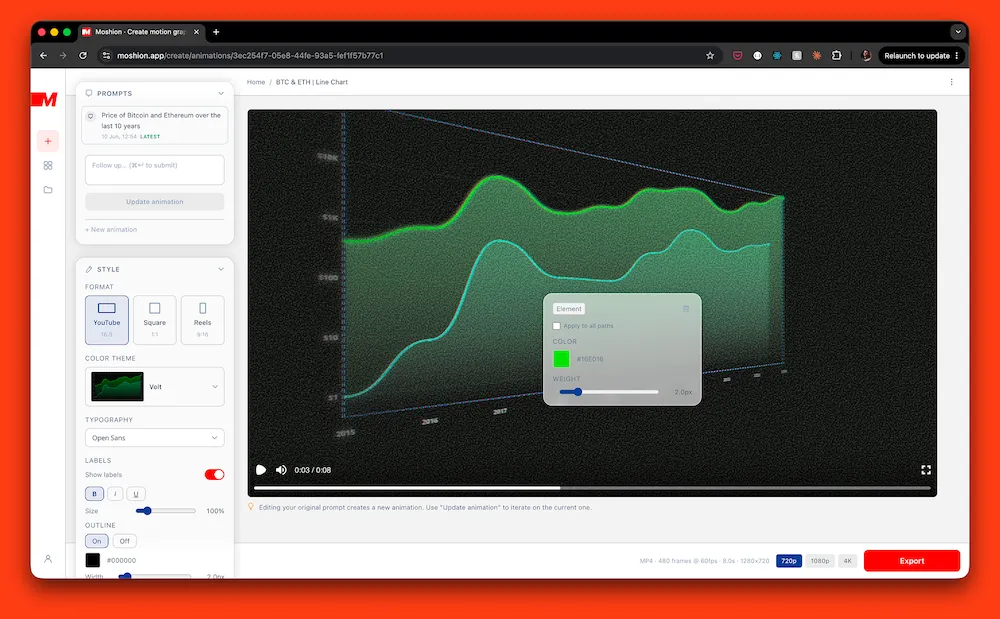
Moshion generates motion design animations for your videos, from a text prompt, in seconds.
It's an animated infographic tool that produces ready-to-export MP4 files from a text description. Made by creators (hi!) for creators: video essayists, travel YouTubers, documentary filmmakers, educators… The kind of people who need a polished explanatory visual layer in their content but don't want to have to learn After Effects.
You describe what you want. Moshion generates the animation and renders a video file, ready to drop into any editing timeline.
You don't have to fiddle with complex setups, MCPs, the terminal, token budgets or paying per refinement.
Moshion puts control back into your hands: anything can be changed so it fits your style: colors, typography, sizes, camera movement, filters…
Either you can describe it, and AI helps you change it, or you can use our simple interface for it. Don’t like the colour? click on it, change the color, done… no need to describe this simple change to an AI at all!
It breaks the frustrating credit-spending back and forth conversation with AI.
Animation types include:
Map animations: routes, region highlights, country comparisons, point-to-point journeys, country-level stat overlays
Concept animations: visualising scale or comparison (e.g. the difference between a million and a billion dollars, aircraft size comparisons)
Charts: line charts, bar charts (including racing charts), pie charts, and more (e.g. price of BTC and ETH over time, browser market shares, racing chart of most watched Youtube channels over time)
Text animations: channel names, lower thirds, titles. There's even a free text animation tool if you want to try it now.
Stat callouts: counters, amounts, dynamic numbers (e.g. an amount of money increasing)
Everything is exported as either a transparent-background or full-bleed MP4, in whatever colour theme fits your edit.
A 7-day free trial is available at https://moshion.app
Moshion is a design tool listed on OpenHunts. The listing describes it as Moshion generates motion design animations for your videos, from a text prompt, in seconds.
Moshion highlights map animations, concept animations, and charts. The listed feature details mention ways to routes, region highlights, country comparisons, point-to-point journeys, country-level stat overlays, visualising scale or comparison (e.g. the difference between a million and a billion dollars, aircraft size comparisons), and line charts, bar charts (including racing charts), pie charts, and more (e.g. price of BTC and ETH over time, browser market shares, racing chart of most watched Youtube channels over time).
Moshion is listed as paid on OpenHunts. Check the official website for current plan limits, trials, and billing details.
Moshion is best for people comparing design tools tools on OpenHunts, especially people using web platforms.
Use the related projects section and category pages on OpenHunts to compare Moshion with other design tools tools by platforms, pricing, and community activity.
These tools are selected from similar categories, platforms, and community activity on OpenHunts.

Shotlab is a lightweight screenshot editor built for creators, indie hackers, and marketers who want better engagement without spending hours on design. Key Features: 📐 Pre-sized canvases for ProductHunt, Twitter, Reddit & more. 🎨 Stunning backgrounds, gradients, cool stickers, frames & more. ⚡ Instant styling - spacing, shadows, and layout handled for you. 🧩 Minimal, distraction-free UI built for speed & efficiency. What makes Shotlab different? ⚡ Focuses on speed + outcomes, not endless customization. ⏱️ Go from raw screenshot to polished visual in under 30 seconds. 🎯 No design skills required. Real outcomes you can expect: 📈 Higher engagement on posts (people actually stop scrolling). ✨ More professional-looking content instantly. ⚡ Faster screenshot editing without needing any design skills. If you regularly share screenshots online, Shotlab helps you make them impossible to ignore.

AI image generator that creates studio-quality visuals through chat. Refine designs across multiple turns without restarting and export up to 4K. No Photoshop or prompt engineering needed.Key features include:Chat-based image generation: Describe your vision and iterate through conversation for perfect results.Multi-turn refinement: Easily tweak and improve images without starting over.Pro-quality export: Export visuals up to 4K resolution with no quality loss.Ideal for:Content creators needing high-CTR thumbnailsBrands requiring consistent visual assetsE-commerce businesses for product photographyA powerful AI image generator for effortless, professional visual creation.

Oniichan is an all-in-one AI manga generator, AI comic creator, and anime art platform that takes you from a story concept to complete illustrated manga pages. Describe your story and the AI generates a structured outline, character reference sheets, and full manga pages with consistent character designs across every panel. Edit individual pages, panels, or characters after generation using AI-powered inpainting and region-level edits. The platform includes an AI anime character creator, OC maker, character reference sheet generator, AI line art colorization, image upscaling, video-to-anime conversion, and image animation tools. A reusable character library lets you save and reuse designs across projects. Supports manga, manhwa, webtoon, and comic art styles with public sharing and presentation mode built in. Free tier available with no sign-up required for basic tools.

tiny.SUPPLY is a custom avatar service that creates simple, minimalistic profile pictures. Key features include:custom hand-drawn avatar in SVG format, made in Figma.clean and simple aesthetic for profile pictures.reflecting character's persona, unique for each member.Ideal for:Individuals seeking a unique and personalized profile picture.Companies looking for consistent branding across employee avatars.Crypto and gaming enthusiasts.

PhotoGPT is a free AI photo editor, enhancer, and generator that creates stunning visuals online in seconds. Key features include:AI-Powered Editing: Automatically enhance and edit photos with AI.Realistic Image Generation: Generate lifelike portraits, product shots, and lifestyle photos.Versatile Applications: Create visuals for portraits, product photography, social media, and marketing.Ideal for:Social Media ManagersE-commerce BusinessesMarketing ProfessionalsPhotoGPT offers a fast, free, and easy way to create professional-quality images without needing complex software or design skills.Try PhotoGPT: https://photogpt.io/

Image Editor Online for quick photo edits with text prompts with AI. Edit, crop, and enhance photos in one click with this free, no-signup AI tool. Key features include:AI-powered editing: Utilize AI filters, background removal, and style generation for professional results.Text-based editing: Edit photos using natural language prompts for intuitive control.No watermark export: Download your enhanced images without any branding.Ideal for:Beginners seeking easy photo enhancementContent creators needing quick image editsUsers wanting watermark-free AI image manipulationEnhance your photos effortlessly with this powerful AI photo editor online.