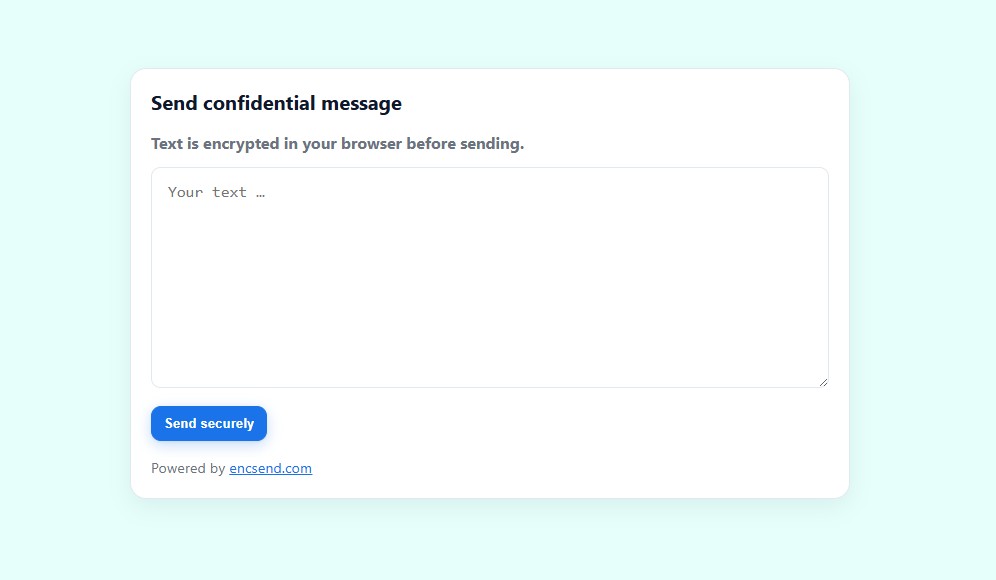
Encsend is the simple, privacy-compliant way to exchange confidential text—no files, no sender accounts. The sender encrypts the content client-side in the browser (zero-knowledge) and shares it via a personal link. The recipient opens the message once, and it’s automatically deleted afterward (“Open & Burn”).
For teams and solo pros, Encsend offers a clean inbox, one-time or permanent links, optional CAPTCHA protection, and notifications for new messages. With the Send Feature, messages can also be delivered securely via email and protected with OTP.
Encsend avoids tracking, stores only what’s technically necessary, and is GDPR-friendly. It’s ideal for agencies, freelancers, HR/Legal/Finance, healthcare forms—anyone who needs to share sensitive information quickly and securely without complex setup.
Zero-Knowledge encryption: encrypts in the browser before anything leaves the device
Open & Burn: single-view messages auto-delete after opening
Inbox for teams & solos: organized view of incoming messages
Link modes: one-time links or reusable permanent links
Optional CAPTCHA: reduce spam on public submit pages
Email delivery (Send Feature): secure email handoff with OTP verification
Notifications: get alerted when new confidential text arrives
No tracking, GDPR-friendly: minimal data collection by design
Create a link (one-time or permanent) and share it.
Sender writes & encrypts the message locally in their browser.
Recipient opens once; the message decrypts client-side and then auto-expires.
Agencies, freelancers, HR, legal, finance, healthcare forms—any workflow that needs fast, secure, and compliant sharing of sensitive information without complex setup.
Encsend - secure text sharing is a productivity tool listed on OpenHunts. The listing describes it as Encsend is the simple, privacy-compliant way to exchange confidential text—no files, no sender accounts. The sender encrypts the content client-side in the browser (zero-knowledge) and shares it via a personal link. The recipient opens the message once , and it’s automatically deleted afterward (“ Open & Burn ”).
Encsend - secure text sharing highlights zero-knowledge encryption, open & burn, and inbox for teams & solos. The listed feature details mention ways to encrypts in the browser before anything leaves the device, single-view messages auto-delete after opening, and organized view of incoming messages.
Encsend - secure text sharing is listed as free on OpenHunts. Check the official website for current plan limits, trials, and billing details.
Encsend - secure text sharing is best for people comparing productivity tools on OpenHunts, especially people using web platforms.
Use the related projects section and category pages on OpenHunts to compare encsend - secure text sharing with other productivity tools by platforms, pricing, and community activity.

These tools are selected from similar categories, platforms, and community activity on OpenHunts.

Secure Memo is a web-based tool for sharing sensitive information securely. It allows users to create encrypted memos that self-destruct after being read or after a set expiration time. Key features include:End-to-End Encryption: Memos are encrypted in the browser using AES-256 encryption before being stored, ensuring privacy.Self-Destructing Memos: Memos automatically delete after being read or after a specified time, ranging from 8 hours to 30 days.Secure Sharing: Users receive a unique URL and a separate random password to share through different channels for enhanced security.Zero-Knowledge: The platform has zero knowledge of the memo's content or password.Ideal for:Journalists sharing sensitive information with sourcesLawyers exchanging confidential documents with clientsIndividuals sharing passwords or private notesSecure Memo provides a simple and reliable way to share sensitive information with peace of mind, knowing that it will be automatically deleted and unrecoverable after its intended use.

Helium Browser is a privacy-focused web browser designed for a clean and uninterrupted browsing experience. Key features include:Best-in-class privacy by default: Blocks ads, trackers, and cookies without requiring user configuration.Unbiased ad-blocking: Uses community-driven filters and uBlock Origin for effective ad and tracker blocking.Native !bangs and split view: Provides handy features for enhanced productivity.Ideal for:Privacy-conscious usersUsers seeking an ad-free browsing experienceDevelopers and researchersHelium Browser offers a clean, fast, and private browsing experience without the bloat and noise of other browsers.

LikeDo is an all-in-one productivity platform that streamlines your workflow by combining multiple tools into a single interface. Key features include:Short Link Management: Create, customize, and track short links with real-time access statistics.Email Management: Create domain-based email addresses, send and receive emails, and utilize AI-powered email assistance.AI-Powered Content Creation: Leverage AI for writing and content generation.Ideal for:Individuals seeking to simplify their online presence.Small businesses looking for a cost-effective productivity solution.Developers who want to integrate with open APIs.LikeDo offers a centralized hub for essential online tasks, saving you time and effort by eliminating the need to juggle multiple tools.

Atoms is built by the team behind MetaGPT and OpenManus, trusted by over one million builders worldwide. It is your Vibe Business team: an AI system that takes an idea and runs the full loop from research to deployment. Powered by open-source models, Atoms has internal benchmarks showing it achieving up to 87% better performance than strong proprietary stacks and up to 80% lower cost. These are different positions on the trade off curve, not the same run. Inside Atoms, a multi agent team handles the entire business path: DeepResearch on markets and competitors, PRD generation, full stack development including authentication, database and Stripe integration, SEO content, and data analytics. Everything runs through a simple chat interface. No setup, no configuration. You describe what you want, review the plan, and approve. Atoms builds the rest. This marks a shift from scaling by hiring to scaling with silicon. Your business no longer scales only with headcount. It scales with compute. You do not ship code. You make decisions. Atoms runs the loop.

🧘♂️ PDFYogi — Private, Secure, and Instant PDF Tools that Run 100% in Your BrowserIn a world where every online PDF tool asks you to upload your files, PDFYogi takes a radically different approach.Your documents never leave your device.PDFYogi is a next-generation suite of 20+ PDF tools that work entirely inside your browser using WebAssembly—the same high-performance tech that powers modern web apps like Figma. All processing happens locally, giving you speed, security, and complete privacy. No uploads, no waiting, no data leaving your computer.🔐 Why We Built PDFYogiMillions of people rely on tools like iLovePDF, SmallPDF, and Adobe Acrobat Online to merge, compress, or convert PDFs. These platforms are polished and powerful, but they all share one design choice: your files are uploaded to their servers.That’s convenient—but risky—when your PDFs contain confidential contracts, bank statements, medical reports, or identity proofs.In today’s internet, where data leaks, scams, and AI scraping are at an all-time high, even a “temporary upload” can expose sensitive information. We built PDFYogi to solve this fundamental trust problem.PDFYogi processes every file locally on your browser. Nothing is sent to the cloud. Nothing is stored. You can edit, compress, convert, and protect your PDFs knowing that the content never leaves your computer.⚙️ What You Can Do with PDFYogiPDFYogi gives you every essential PDF feature, re-engineered for privacy:🗜️ Compress PDF – Reduce file size instantly without uploading.🧩 Merge or Split PDFs – Combine or separate pages offline.🔒 Protect & Unlock PDFs – Add or remove passwords securely.✍️ Sign, Watermark & Number Pages – Professional finishing tools.🖼️ Convert Between Formats – PDF ⇄ Word / Excel / PowerPoint / JPG / PNG.📑 Extract, Crop, Rotate, and Organize Pages.🔍 OCR Support – Make scanned documents searchable directly in your browser.Every tool is fast, lightweight, and works on desktop and mobile. There’s no signup, no login, and no tracking.⚡ Faster Than Cloud ToolsBecause there’s no upload or download step, PDFYogi often finishes a task 5–10× faster than server-based alternatives. You’ll see results instantly—ideal when you’re on a deadline or dealing with large files.🔒 Built for Professionals Who Value ConfidentialityPDFYogi is designed for:Lawyers and consultants handling sensitive contracts.Freelancers and startups managing client proposals or NDAs.Finance teams processing invoices and reports.Students and teachers sharing research papers securely.Anyone who simply wants peace of mind while working with personal documents.🌍 Multilingual and AccessiblePDFYogi is currently available in English, Spanish, and Portuguese, with more languages coming soon. Each localized version is fully SEO-optimized with translated URLs and content, ensuring a smooth experience for users worldwide.🧩 How It WorksWhen you open a tool, our lightweight WebAssembly engine runs directly in your browser tab. Your CPU handles the conversion or compression in real time. Once you close the tab, everything disappears—no residual files, no cloud copy, no traces left behind. It feels like a native app but runs completely on the web.🚀 The Future of Privacy-First ProductivityOur mission is to make secure, offline-style document processing accessible to everyone online.Upcoming features include:AI-based summarisation and Q&A on PDFs.Offline Progressive Web App (PWA) mode.Developer SDKs for integrating PDFYogi’s browser engine into enterprise apps.We envision a world where people no longer have to trade privacy for convenience.💬 Try PDFYogi TodayExperience the simplicity of modern PDF editing—without the risk of uploading your files.Fast. Private. Free.👉 https://pdfyogi.com

Snippets Library is a code snippet manager that helps developers store, organize, and share code snippets efficiently. Key features include:Syntax Highlighting: Provides beautiful syntax highlighting for various programming languages.Instant Search: Enables quick and easy searching of stored snippets.Public/Private Sharing: Allows users to share snippets publicly or keep them private.Code Organization: Offers tools to organize snippets for better management.Ideal for:Software developersWeb developersProgrammersSnippets Library enhances developer productivity by providing a centralized and easily accessible repository for code snippets, improving workflow and collaboration.