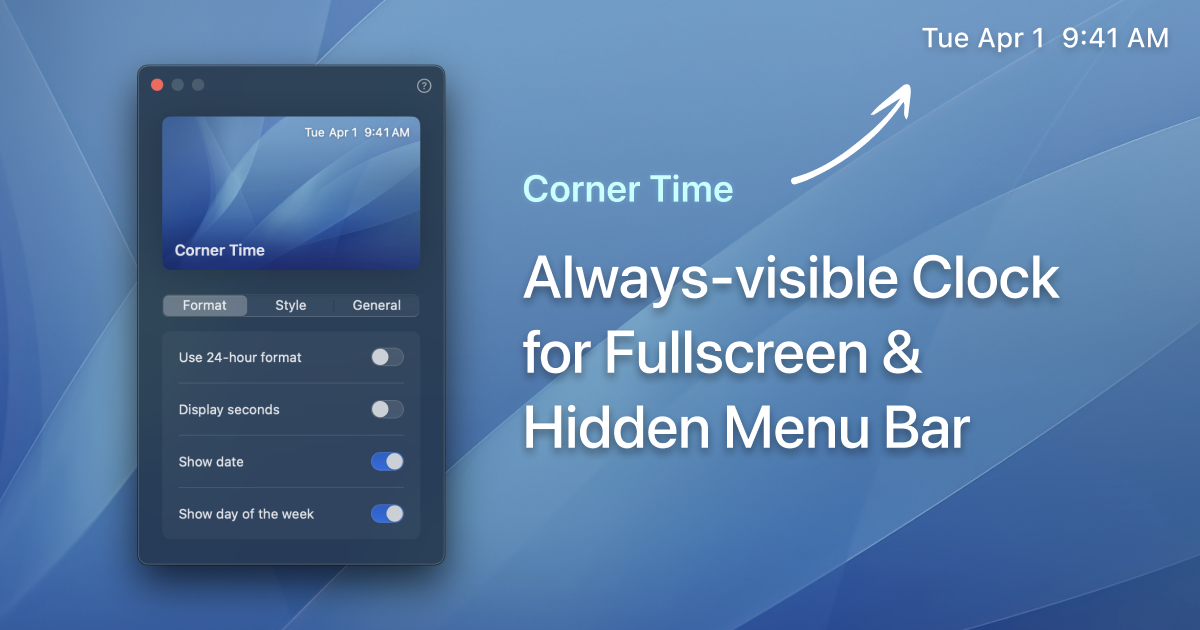
Corner Time is a minimalist macOS app designed to keep the time always visible, even when your menu bar is hidden or you're in fullscreen mode. This app is perfect for those who prefer a distraction-free workspace and embrace digital minimalism.
WHY I BUILD THIS
I love keeping my menu bar hidden for a cleaner, distraction-free workspace. But constantly moving my cursor to the top just to check the time got annoying.
So I built Corner Time – a native-like clock that could always show the current time in fullscreen mode or whenever the menu bar is hidden. It looks simple, but it has genuinely improved my daily workflow. Users have also said this is an eagerly long-awaited app.
KEY FEATURES
Always Visible: The clock remains visible even during fullscreen sessions (even in Safari’s or VLC’s fullscreen mode), ensuring you never lose track of time.
Customizable Formats: Choose from various formats and styles, or create your own custom format to suit your preferences.
Lightweight: Designed to have a low energy impact, ensuring your device's performance is not compromised.
Multi-Display Support: Automatically detects all connected displays, allowing you to enable or disable the clock on each display individually.
Optional Background: Enhance readability on different places
Stylized Fonts: Select the font that best matches your style, with local fonts support on the roadmap.
Multi-Language Support: Automatically displays time in your system's language, with support for 10 languages.
Introduction video: https://www.youtube.com/watch?v=G5y380i2M58
Currently available on the Mac App Store for USD $1.99 and requires macOS 13.0 or later. Experience a native-like time display that integrates seamlessly into your workflow.
Corner Time is a productivity tool listed on OpenHunts. The listing describes it as a minimalist macOS app designed to keep the time always visible, even when your menu bar is hidden or you're in fullscreen mode. This app is perfect for those who prefer a distraction-free workspace and embrace digital minimalism.

Corner Time highlights always visible, customizable formats, and lightweight. The listed feature details mention ways to the clock remains visible even during fullscreen sessions (even in Safari’s or VLC’s fullscreen mode), ensuring you never lose track of time, choose from various formats and styles, or create your own custom format to suit your preferences, and designed to have a low energy impact, ensuring your device's performance is not compromised.
Corner Time is listed as paid on OpenHunts. Check the official website for current plan limits, trials, and billing details.
Corner Time is best for people comparing productivity tools on OpenHunts, especially people using desktop platforms.
Use the related projects section and category pages on OpenHunts to compare Corner Time with other productivity tools by platforms, pricing, and community activity.
These tools are selected from similar categories, platforms, and community activity on OpenHunts.

Your desktop buddy that can detect when you reach for your phone, step away from your desk, or switch to distracting apps. It gently nudges you back on track during timed focus sessions and generates a PDF report with your focus score, distraction log, and activity breakdown. Built privacy first: no facial recognition, no screenshots, no permanent data storage. Free for macOS and Windows.

Turn raw screen captures into polished videos. Auto zoom, backgrounds, camera overlay & 4K export — one-time $29, no subscription.

Refbox is a floating reference app for creatives who want their inspiration visible while they work. Pin images, GIFs, videos & notes in always-on-top frames above your apps. No more window switching while you sketch, design, animate, or model.Add media from the web, your computer, or your clipboard into a floating, resizable sidebar. View references in Masonry Mode (Pinterest-style), drag individual items onto your desktop that you can resize and rearrange, or use a full-screen Gallery for second monitors.Add markdown-enabled notes for ideas, todos, or instructions without reaching for a separate app. Save clickable links as bookmarks to tutorials, articles, and other resources you need. Scrub through videos and GIFs with frame-by-frame playback. Create multiple collections of references and instantly swap between them. Refbox is the essential companion for creatives who need inspiration at their fingertips while they work.

Vowen turns your computer into a true voice-first productivity machine on macOS and Windows. Vowen processes speech locally for ultra-fast, private transcription in 99 languages.Transcribe instantlyOffline, secure, and blazing fast. Hold a shortcut, speak, and your words appear in any app—exactly where your cursor is.Trigger context-aware AIEnable AI Mode to generate smart replies, summaries, code, emails, translations, or explanations—automatically tailored to what you’re working on.Record meetings & take notesCapture screen and audio to produce clean, structured notes with action items, decisions, highlights, and next steps. Works with Zoom, Teams, Meet, and more (Windows coming soon).Voice-control everythingStore files in your memory bank for richer context and use voice commands to launch apps, open sites, or start AI workflows.Built for developers, writers, professionals, accessibility users, and anyone who wants to work at the speed of thought.

The #1 time-blocking app for macOS - focus without the friction and fluff. Hey OpenHunts! 👋 I’m Dudley, a solo developer based in Paris, and I built Chunk because I genuinely couldn’t find a time blocking app that felt right on a Mac.Every app I tried had the same problem. It either lived in the dock and took over your screen, or it was buried inside some bloated productivity suite that charged £10/month for 50 features you didn’t need.I wanted something in my menubar. Always one click away, or just cmd + /.So I built Chunk.What it does:🖱 Click and drag on a timeline to create time blocks - no forms, no friction🗓 Syncs with Google Calendar, Apple Calendar, Outlook, and Apple Reminders📅 Day and week view for planning ahead✅ Built-in to-do list - capture tasks, then drag them into your day when you’re ready🔁 Templates and routines - build your ideal day once, reuse it whenever you want🍎 Built specifically for macOS - not a web app in a wrapperPricing is simple: one-time lifetime licence, 7-day free trial, no card required, no subscription ever.

Helium Browser is a privacy-focused web browser designed for a clean and uninterrupted browsing experience. Key features include:Best-in-class privacy by default: Blocks ads, trackers, and cookies without requiring user configuration.Unbiased ad-blocking: Uses community-driven filters and uBlock Origin for effective ad and tracker blocking.Native !bangs and split view: Provides handy features for enhanced productivity.Ideal for:Privacy-conscious usersUsers seeking an ad-free browsing experienceDevelopers and researchersHelium Browser offers a clean, fast, and private browsing experience without the bloat and noise of other browsers.