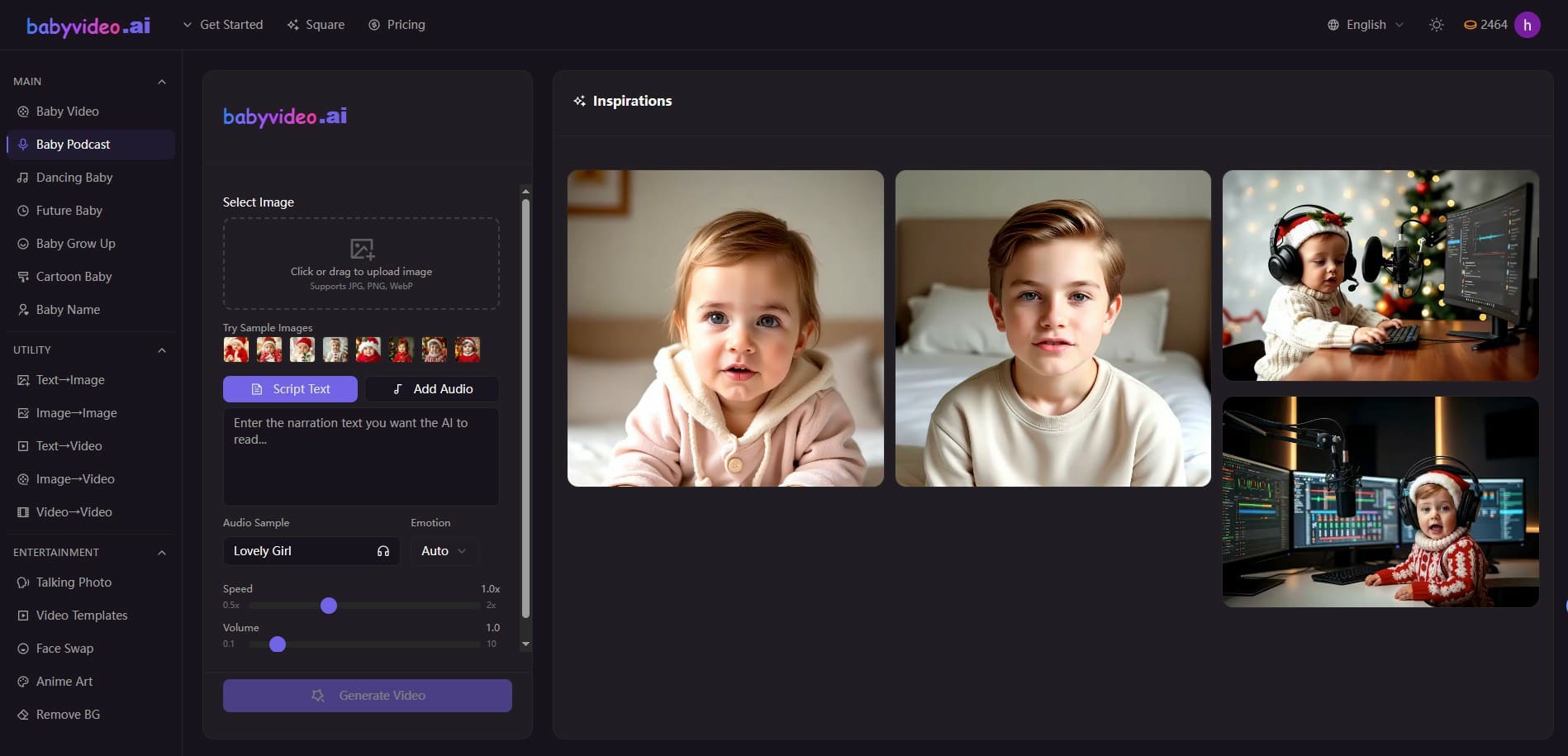
BabyVideo.ai is an AI-powered platform that allows anyone to create adorable baby videos, future baby images, baby grow-up animations, and cartoon baby transformations using just a photo. It is simple, fast, and perfect for personal memories or social media content.
BabyVideo is a design tool listed on OpenHunts. The listing describes it as BabyVideo.ai is an AI-powered platform that allows anyone to create adorable baby videos, future baby images, baby grow-up animations, and cartoon baby transformations using just a photo. It is simple, fast, and perfect for personal memories or social media content.
Based on the OpenHunts listing, BabyVideo works as a design tool. Check the project description, screenshots, and website link before trying it.
BabyVideo is listed as freemium on OpenHunts. Check the official website for current plan limits, trials, and billing details.
BabyVideo is best for people comparing design tools tools on OpenHunts, especially people using web platforms.
Use the related projects section and category pages on OpenHunts to compare BabyVideo with other design tools tools by platforms, pricing, and community activity.
These tools are selected from similar categories, platforms, and community activity on OpenHunts.

Shotlab is a lightweight screenshot editor built for creators, indie hackers, and marketers who want better engagement without spending hours on design. Key Features: 📐 Pre-sized canvases for ProductHunt, Twitter, Reddit & more. 🎨 Stunning backgrounds, gradients, cool stickers, frames & more. ⚡ Instant styling - spacing, shadows, and layout handled for you. 🧩 Minimal, distraction-free UI built for speed & efficiency. What makes Shotlab different? ⚡ Focuses on speed + outcomes, not endless customization. ⏱️ Go from raw screenshot to polished visual in under 30 seconds. 🎯 No design skills required. Real outcomes you can expect: 📈 Higher engagement on posts (people actually stop scrolling). ✨ More professional-looking content instantly. ⚡ Faster screenshot editing without needing any design skills. If you regularly share screenshots online, Shotlab helps you make them impossible to ignore.

Wan Animate is an AI-powered platform that allows users to create character animations and swap characters in videos. Key features include:Character Animation: Bring any character to life by accurately capturing a performer's facial expressions and movements.Character Swap: Swap the video character with a photo character.Photo Animation: Animate photo characters based on performer videos.Ideal for:Content creatorsSocial media usersAnimatorsWan Animate offers a user-friendly interface to create stunning animations quickly and easily, without requiring advanced animation skills.

Bravemark is a platform that simplifies the creation and sharing of online brand guidelines. Key features include:Responsive Design: Creates brand guidelines that adapt to any device.Asset Management: Allows for easy uploading and downloading of brand assets.Customization: Enables users to create stylish and custom brand identity guidelines.Easy Sharing: Provides a simple URL link for clients to access and update brand guidelines.Ideal for:Brand Identity DesignersMarketing AgenciesBusinesses of all sizesBravemark eliminates the need for clunky PDFs and Zip files, offering a modern and efficient way to manage and share brand identity.

TimeTuna is a beautiful, branded scheduling page creator, designed to make booking appointments a visually appealing experience. Key features include:Video backgrounds: gorgeous video backgrounds are assigned to each booking page, and it is possible to customise it laterCalendar Sync: Real-time synchronization with Google and Microsoft Calendars to avoid scheduling conflicts.Multiple DurationsIdeal for:FoundersAgenciesDesignersReal-estate agentsTimeTuna offers a visually stunning alternative to traditional scheduling tools, reflecting the professionalism of your brand.
Remove watermarks, text, subtitles, and unwanted objects from videos online.What it doesRemoveFrom.Video leverages advanced AI to effortlessly remove watermarks, text overlays, hardcoded subtitles, and distracting objects from your video footage. It preserves the natural look and high quality of your videos, eliminating the need for complex editing software or professional skills. Simply upload your video and let the AI do the work.Key featuresAI Watermark Remover — Instantly erase logos, brand marks, and TikTok or YouTube watermarks without affecting video quality.AI Text Eraser — Automatically detect and remove titles, captions, and overlay text, seamlessly restoring the original background.AI Subtitle Remover — Effortlessly delete hardcoded subtitles and burned-in captions from any video, no manual frame-by-frame editing required.AI Object Eraser — Utilize advanced video inpainting to remove people, background distractions, signs, or any unwanted elements, keeping the scene natural.HD Output — Ensures your cleaned videos maintain high definition quality after removal.Use casesReposting social media content across different platforms while removing original watermarks.Cleaning up screen recordings or tutorials by removing text overlays and captions.Enhancing travel videos or marketing content by removing unwanted objects or people.What makes it differentRemoveFrom.Video offers a user-friendly, online solution powered by sophisticated AI for precise object removal without requiring any prior video editing experience or software installation. It focuses on maintaining video integrity and natural appearance post-removal.